개발 블로그
[스프링 입문] 뷰 컨트롤러 환경설정 본문

스프링 부트가 제공하는 Welcome Page 기능
- static/index.html 을 올려두면 Welcome page 기능을 제공한다.
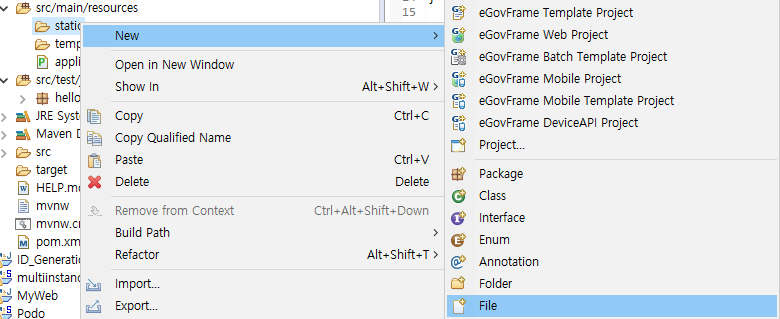

src/main/resources/static에 index.html 파일을 만들어서 넣어주면 이게 웰컴 파일이 된다.
index.html
<!DOCTYPE HTML>
<html>
<head>
 <title>Hello</title>
 <meta http-equiv="Content-Type" content="text/html; charset=UTF-8" />
</head>
<body>
Hello
<a href="/hello">hello</a>
</body>
</html>


방금 만든 index.html이 그대로 뜬다
컨트롤러가 뷰를 연결하는 법
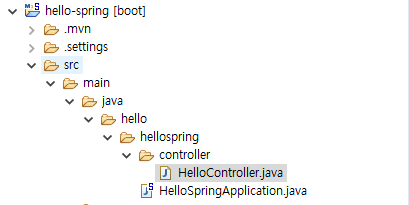

HelloController를 만들어 준다
@Controller
public class HelloController {

     @GetMapping("hello")
     public String hello(Model model) {
     model.addAttribute("data", "hello!!");
     return "hello";
     }
}
- hello라는 url로 컨트롤러를 매핑해서 요청시 메소드가 실행된다
- 모델에 data라는 키에 "hello"라는 값을 주었다
- 메소드의 리턴값으로 "hello"를 주게되면 ViewResolver가 "hello"라는 제목을 찾는다
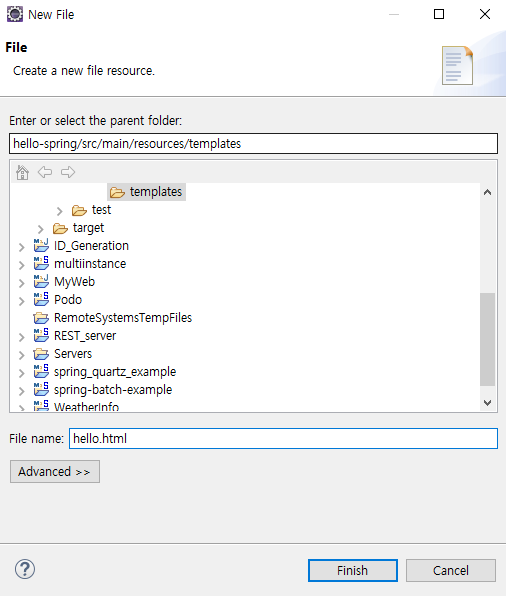
hello.html 을 templates 폴더 밑에 만들어 준다
<!DOCTYPE HTML>
<html xmlns:th="http://www.thymeleaf.org">
<head>
 <title>Hello</title>
 <meta http-equiv="Content-Type" content="text/html; charset=UTF-8" />
</head>
<body>
<p th:text="'안녕하세요. ' + ${data}" >안녕하세요. 손님</p>
</body>
</html>
\hello로 접속하게 되면

이렇게 컨트롤러 모델에 넣어준 값이 html에 뜨게 된다

'Spring' 카테고리의 다른 글
| Mybatis (0) | 2024.07.31 |
|---|---|
| [스프링 입문] API (0) | 2023.03.22 |
| [스프링 입문] MVC와 템플릿 엔진 (0) | 2023.03.21 |
| [스프링 입문] 정적 페이지 (0) | 2023.03.21 |
| [스프링 입문] 스프링 스타터로 스프링 부트 시작하기 (0) | 2023.03.21 |
'Spring' Related Articles
more


